YX 128 Slots SimBank & VoIP Gateway SIMPOOL SIM Cards Management Software
(If you need to see more product pictures Or other assistance, please contact customer service)
- Save $1.00 for each $100.00 spent
| Model Number | SimBank 128 |
| Brand Name | YXCALL |
| Compatible | All YX Machines |
| SIM Slot | 128 SIM |
|
Web GUI: |
Firefox/Chrome/IE/Opera |
|
Features |
● NAT Traversal and Firewall ● Hot Swap of SIM Cards without Powering Off ● QoS support ● Remote Manage of SIM Cards ● Support Chinese and English language ● Dynamic Allocation of SIM Cards ● Protect SIM Cards from Blocking ● HTTP/TFTP Upgrade |
| Interface Type |
1 WAN 10/100Base-T ethernet(RJ-45connector) 1 Console(USB) |
|
LEDs |
1 Power and 128/256/512 grops of card online and running status indicator |
|
Network Protocols |
DHCP/PPPoE/VPN(pptp) Telnet/HTTP/FTP/TFTP |
|
Power Supply |
100-240V AC, 50-60Hz IN, 12V/3A OUT |
|
Operating Environment |
Operating temperature: 0-50ºC Operating humidity: 10–90%RH |
|
Warranty |
12 Months |
| Shipping method | Support DHL, UPS, FEDEX, EMS, 4PX Cainiao standard logistics and dedicated lines (some countries have dedicated lines logistics, Specific consultation with customer service) Tip: (1) Express delivery is faster than dedicated lines, but customers need to handle customs clearance and tax payment, and there will be logistics trajectory updates throughout the process. (2) Dedicated line logistics is slower, but includes customs clearance and tax payment, and is delivered directly to the home. The logistics trajectory updates will only be available after the package arrives at customs clearance and is handed over to the local logistics provider. |
| Payment method | Support payment methods such as USDT, PayPal, credit card, TT, etc (Pay with USDT and there are no additional transaction fees, so 3% discount on the product price is given) Please consult customer service for USDT address,Other payment methods can be redirected to the checkout page for online payment |
| Ordering Process | Payment for the product you need to order, we will arrange for stock testing after confirming the accuracy of the delivery information with you. We expect to arrange shipment within 2 days and provide you with package picture and logistics tracking number for tracking. Customer service will send message to remind you of tax payment and logistics delivery. If you need technical support after receiving the goods, please leave a message to our customer service personnel, and we will arrange for a technician to assist |
| Customer service contact information | Whatsapp: +8615220722893 Emai: yx@yxinternet.com Telegram: @YXwendy Teams: yuexun@yx19999.net |
|
Working mode |
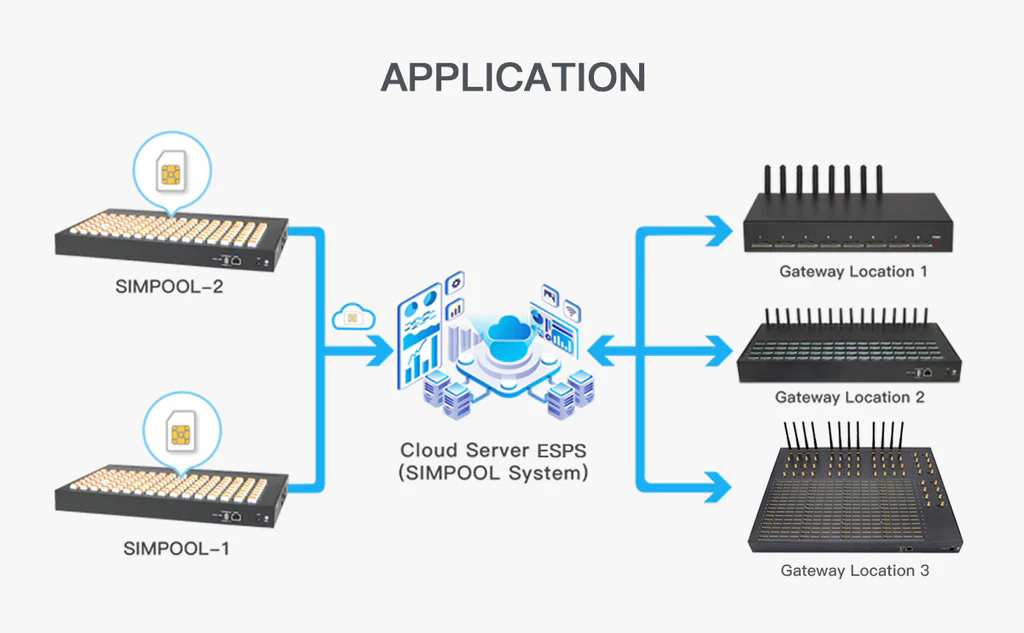
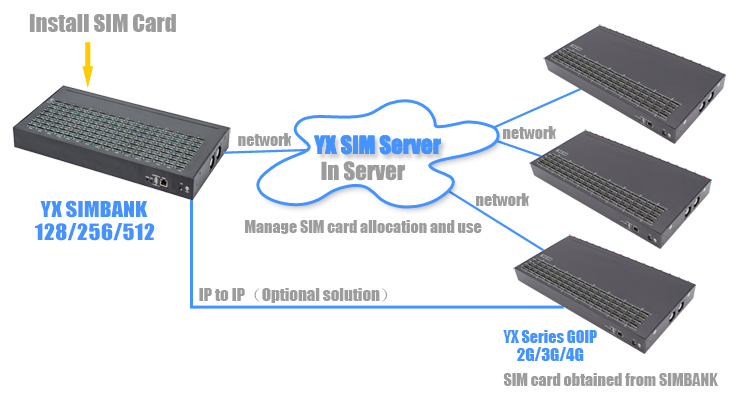
Simbank has two working mode: Simbank communicate with gateway without server |
|
Point to Point |
|
|
Registration(SIMServer) |
![]() |
Description:
YX 128-Slot SIM Bank
● Centralized control of 128 SIMs via TCP/IP
● Seamless integration with YX gateways
● Perfect for SIM pooling, VoIP, & bulk SMS! Cut costs, boost efficiency, and manage global SIMs remotely with AT command & HTTP protocol support!
Core Features:
Remote SIM-Device Separation: Control SIMs via TCP/IP for flexible, location-independent management.
AT Command & HTTP Protocol: Automate workflows and integrate with third-party systems effortlessly.
Seamless Integration
Compatibility: Works flawlessly with all YX gateways (VoIP, SMS, SIM boxes).
SIM Pooling: Optimize SIM usage across multiple devices or regions with centralized management.
Enterprise-Grade Efficiency
Bulk SMS & VoIP Support: Ideal for high-volume messaging/call centers.
Global Scalability: Manage SIMs across countries/regions from a single interface.
Reliability & Security
Sturdy Build: Durable design for 24/7 operations.
12-Month Warranty + Dedicated technical support.

Technical Specs:
Slots: 128 SIM slots (hot-swappable).
Interface: USB connectivity for easy setup.
Protocols: HTTP, AT command, TCP/IP.
Brand: YXCALL (Model: SimBank 128).
Why Choose YX SIM Bank?
Cost Savings: Reduce hardware costs by decoupling SIMs from devices.
Flexibility: Switch SIMs manually or automate via scripts.
Scalability: Grow from 1 to 128 SIMs without hardware upgrades.
Perfect For:
Telecom operators managing global SIM fleets.
Bulk SMS/VoIP service providers.
Enterprises requiring centralized, remote SIM control for IoT, call centers, or marketing campaigns.
High-Capacity SIM Pool, Remote SIM Management, YX Gateway Integration, TCP/IP SIM Control, Scalable SIM Solution, AT Command Automation.
Need Assistance? Contact customer service (9:00 AM - 6:00 PM GMT+8) for product images or queries!
Whatsapp: +8615220722893
Emai: yx@yxinternet.com
Telegram: @YXwendy
Teams: yuexun@yx19999.net
About Us
YxInternet is a professional supplier specializing in consumer electronics, smart devices, and lifestyle products. With years of experience in global trade and a strong supply chain network, we provide businesses and end-users with reliable products at factory-direct prices.
Our mission is to bridge quality manufacturing with global buyers, making cross-border sourcing easier, faster, and more transparent. From product selection to quality control, and from fast delivery to after-sales support, YxInternet ensures every order meets high expectations.

Why Choose Us
FAQ
1.Who are we?
YxInternet is a trusted supplier offering consumer electronics, smart devices, connecting global buyers directly with high-quality factories.
2.How can we guarantee quality?
Factory audits to verify production capabilities
Product sampling and testing
Pre-shipment quality checks to confirm product specifications
3.What can you buy from us?
We offer a wide range of products, including:
SMS Modem
SMS Dongle
Voip gateway
SMS gateway
eSIM Gateway
IP Phone
Modules/Accessories
Customized products for bulk orders
4.Why should you buy from us instead of other suppliers?
Direct factory pricing with no middleman markup
Comprehensive quality control from production to delivery
Flexible order solutions for both retail and wholesale
Fast global shipping and reliable logistics
Dedicated after-sales support to resolve any issues
5.What services can we provide?
Product sourcing and customization
OEM and private label support
Product quality inspections
Global shipping coordination
After-sales support and warranty services
Simbank128/256/512 is an equipment which can integrated storage SIM cards.The maximum capacity is 128/256/512.It can be perfectly with YX GOIP and MOIP series gateways.With SIM server,Simbank can easily communicate with gateways via IP network.In this way,we can manage the SIM cards remotely.
Provides enterprises with a centralized, flexible and cost-effective SIM management solution that ensures optimal performance and reliability across the entire network infrastructure.

2、Hardware Features
|
Model |
Simbank 128/256/512 |
|
Number of Sim |
128/256/512 |
|
Network Protocols |
DNHTPCP/PPPoE/VPN (pptp) Telnet/HTTP/FTP/TFTP |
|
Number of Ports |
1 WAN 10 /100Base-T ethernet (RJ-45 connector) 1 Console (USB) |
|
LED |
1 Power and 128/256/512 grops of card online and running status indicator |
|
Power Supply |
100-240V AC,50-60 Hz IN,12V/3A OUT |
|
Operating Environment |
Operating temperature:0-50ºC Operating humidity:10–90%RH |
|
Dimension (L*W*H) |
530*305*90mm |
|
Weight |
4kg |
|
Warranty |
12 Months |
3、Appearance

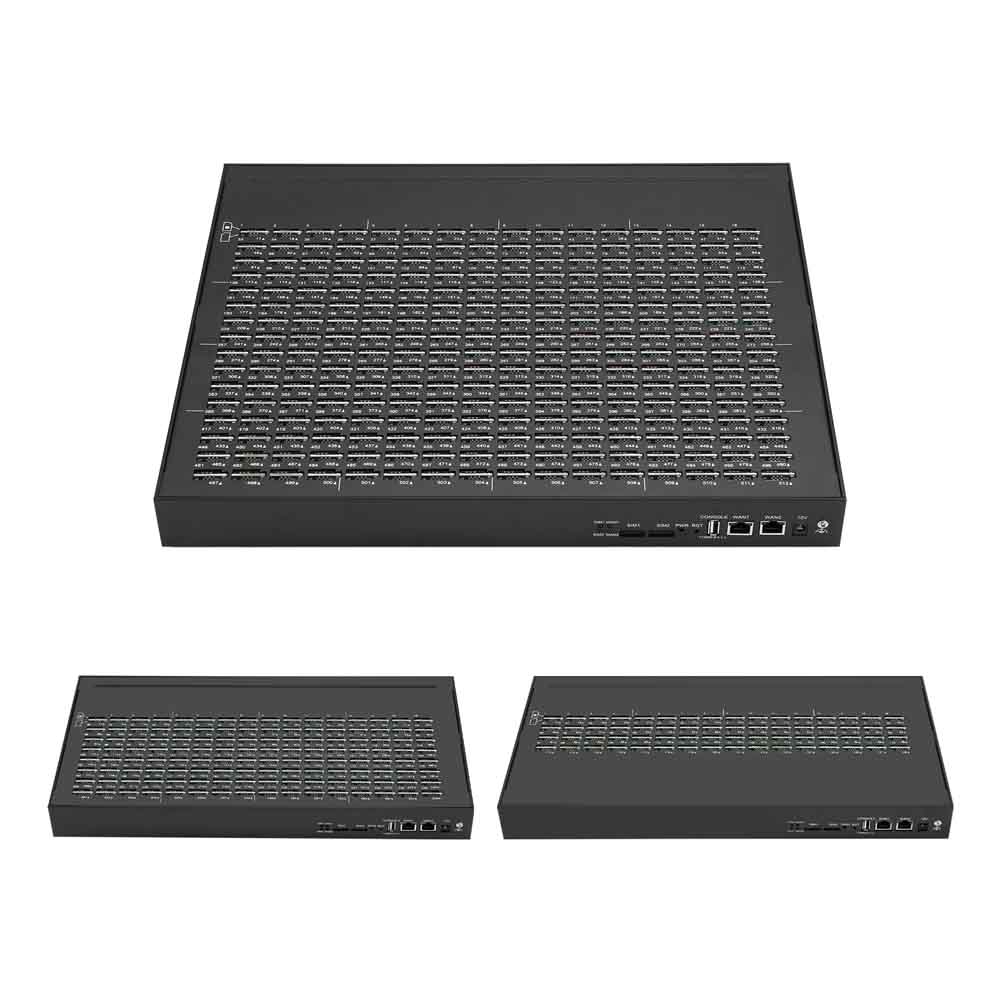
● 128/256/512 SIM Slots
● 1 Console (USB)
● 1 WAN Interface
● 1 Power Interface
● 1 Power Indicator
● 1 Reset Button
4、Special Features
● 128/256/512 Channels Optional
● Web GUI:Firefox/Chrome/IE/Opera
● NAT Traversal and Firewall
● Hot Swap of SIM Cards without Powering Off
● QoS support
● Remote Manage of SIM Cards
● Multi-language Support:Chinese and English
● Dynamic Allocation of SIM Cards
● Protect SIM Cards from Blocking
● HTTP/TFTP Upgrade
5、Key Features
Centralized Management: Securely store and manage all SIM cards and devices in one centralized location.
● Working mode
Simbank has two working mode: one is point to point, in this way,Simbank communicate with gateway without server;The other mode is registration, and need a server support it .
(1) Point to Point
(2) Registration(SIMServer)
● Device Setup

When setup the device, please follow the steps below:
1.Power: Connect the small end of the power cable to the power input port on the Simbank back panel, and plug the other end of the cable into a 220V AC power outlet.
2.WAN: Connect the Ethernet cable with the Simbank wan port, the other side connect with the switch or router.
3.CONSLOE: USB port configuration.
4.RESET: Press this button more than 7S.
▼Example of operating interface